
Indonesia SIM Cards, eSIMs and Staying Connected Across Islands
Choose the network and the backup plan first; the SIM format comes second.
Original conceptual illustration, not a network-coverage map or a photographed location.
Indonesia SIM cards and eSIMs solve several different problems: arriving with data, making ordinary phone calls, receiving account-verification messages and staying reachable between islands. One product may not solve all four. A large allowance is not especially valuable if the underlying network does not serve the place you are going.
This guide compares the practical choices without claiming to have field-tested reception. It uses published operator and device guidance, with original data-budget and backup-network examples. Package prices, partner networks and eligibility should be checked again before purchase.
This article contains affiliate links. Taylor’s Trailblazing Travels may earn a commission when you book or buy through them, at no extra cost to you.
Compatibility
Check the exact model, sales region and network lock.
Coverage
Country coverage is not a promise for every island or boat route.
Registration
Local SIM activation and device IMEI access are separate checks.
Backup
Use a different underlying network when redundancy matters.
Compare Indonesia SIM cards and eSIMs by the job they do
A physical SIM and an eSIM are ways of putting a service on a phone; neither format guarantees better reception. Apple explains that an eSIM can be used with a local or international provider, including data-only travel services. The specific carrier and package remain the important details. [1]
| Option | Main practical advantage | What to verify |
|---|---|---|
| Home-network roaming | Keeps the existing service and familiar account | Indonesia inclusion, daily charges, limits and voice costs. |
| Local tourist SIM | In-person activation support and a local service | Passport registration, device IMEI, allowance and whether a number and calls are included. |
| International travel eSIM | Can be arranged before arrival on a compatible phone | Supported local networks, activation trigger, data-only versus voice and tethering terms. |
| Wi-Fi only | Avoids buying mobile data | How you will contact transport and accommodation away from Wi-Fi. |
The comparison is about trade-offs, not a cheapest-provider ranking. A traveller who needs ordinary local calls may value a different plan from someone who mainly uses maps and messaging. A short trip with roaming already included can also be simpler than buying another service.
Write down your essential jobs before shopping: contact the arrival driver, navigate to accommodation, receive a bank verification message and handle a changed ferry booking. Then ask which connection handles each one. Do not discover after landing that the plan selected for inexpensive data cannot make the type of call you need.
Check your device before buying anything
For an iPhone using another provider, confirm that it is unlocked and supports the intended eSIM arrangement. Apple cautions that support varies by model and country or region. Android users should check the exact model variant with the manufacturer and eSIM supplier rather than relying on the family name printed on an online listing. [1]
Check how many lines can be active at once, not just how many profiles can be stored. Decide whether the UK line must remain available for verification messages or calls. Do not delete an existing eSIM simply to make space without understanding how it can be restored.
Set the data line deliberately
Label the lines clearly, for example Home and Indonesia. Choose the intended mobile-data line and inspect automatic data-switching settings. Follow the travel provider’s roaming instructions for that line while controlling roaming on the home line; turning every roaming switch on or off indiscriminately can either create charges or prevent the travel plan from working. [2]
Receiving a code, making a call, sending a message and using mobile data are different activities under a home provider’s tariff. Ask that provider how each is charged in Indonesia. Do not assume that switching off data roaming also prevents all voice or messaging charges.
Before departure, save installation instructions where they can be opened without data. If setup uses a QR code, work out how to display it for scanning or use the provider’s supported direct-install method. A screenshot on the same phone may require a different installation workflow.
Local SIM registration and IMEI: do not confuse the two
Indonesia Customs says foreign tourists using an Indonesian SIM can register the device through an operator outlet for access lasting up to 90 days. Its guidance distinguishes this from use with a foreign SIM on international roaming. Longer stays and imported-device circumstances require separate attention. [3]
An IMEI is a device identifier, not a visa or a data allowance. Registering a SIM subscriber does not by itself prove that the device has been correctly enabled for local-network use. Ask the authorised seller to verify both and demonstrate a working connection with Wi-Fi switched off before you leave.
A practical tourist-SIM purchase checklist
Bring the phone and passport to an authorised operator channel. Ask what identifying information is required, which device identifier is being registered, how long access lasts and what happens when the package expires. Obtain the receipt and the operator’s own support route. Do not buy a supposed shortcut based on someone else’s identity.
Telkomsel describes its Tourist Prepaid Card as a tourist starter pack that can be ordered online and collected in Indonesia. Its eligibility FAQ specifies an international tourist’s passport and IMEI for validation. Confirm collection location, opening arrangements, current allowance and price directly rather than assuming every airport counter sells the same package. [4][5]
The temporary 90-day device arrangement is not an extension of immigration permission. Nor should every product marketed as an eSIM be assumed to bypass Indonesian registration: a locally provisioned service and an international roaming service can use different arrangements. For a stay beyond the temporary period, consult Customs and the chosen operator before relying on a short-stay solution. [3]
Choose coverage for the islands and properties you will use
A country-level coverage label is a starting point, not a room-level prediction. Ask the accommodation which networks guests currently use successfully, whether reception works inside the room and where staff go when the connection fails. For remote trips, ask the boat or tour operator when they expect passengers to be out of contact.
Airalo’s Indonesia page identifies the underlying network information alongside its packages. Read the complete supported-network list for the exact option you are buying; do not assume that every Airalo product, or a package sold previously, uses the same network. [6]
Telkomsel provides a dedicated 5G coverage checker and describes its 5G service as location-dependent. A 5G logo in a product description does not establish that the island, property or handset configuration will use 5G. Choose reliable service for your intended tasks rather than treating the generation number as a destination recommendation. [7]
Ask a question someone can answer
Instead of asking whether an island has good internet, ask whether the named network works at the guesthouse, whether video calls have been reliable recently and whether the property has a fallback when its main connection fails. A dated speed test can help discuss a requirement, but it is not a guarantee of future performance.
Working travellers should explain their actual needs: an occasional email is different from a scheduled high-stakes video meeting. Consider placing essential work sessions in a base with several realistic connection options. Buying a more generous package cannot remedy an uncovered location.
For a holiday, deliberately offline periods may be perfectly acceptable. Download tickets and routes beforehand, agree when you expect to reconnect and avoid leaving a time-critical booking confirmation dependent on signal during a crossing.
Estimate data from your habits, with a visible allowance for uncertainty
Use your phone’s own recent mobile-data history as the starting point. Reset or record the relevant usage period, distinguish mobile data from Wi-Fi and account for holiday activities such as navigation, photo backup or sharing a hotspot. Then calculate days multiplied by assumed daily use, with a reserve.
The examples below are original arithmetic scenarios, not measured traveller averages or advertised packages. They assume 14 days and a 25% reserve. Video streaming, cloud backups and laptop use can change the result substantially.
| Chosen daily-use assumption | Fourteen days before reserve | With 25% reserve |
|---|---|---|
| 0.3 GB per day | 4.2 GB | 5.25 GB |
| 0.7 GB per day | 9.8 GB | 12.25 GB |
| 2 GB per day | 28 GB | 35 GB |
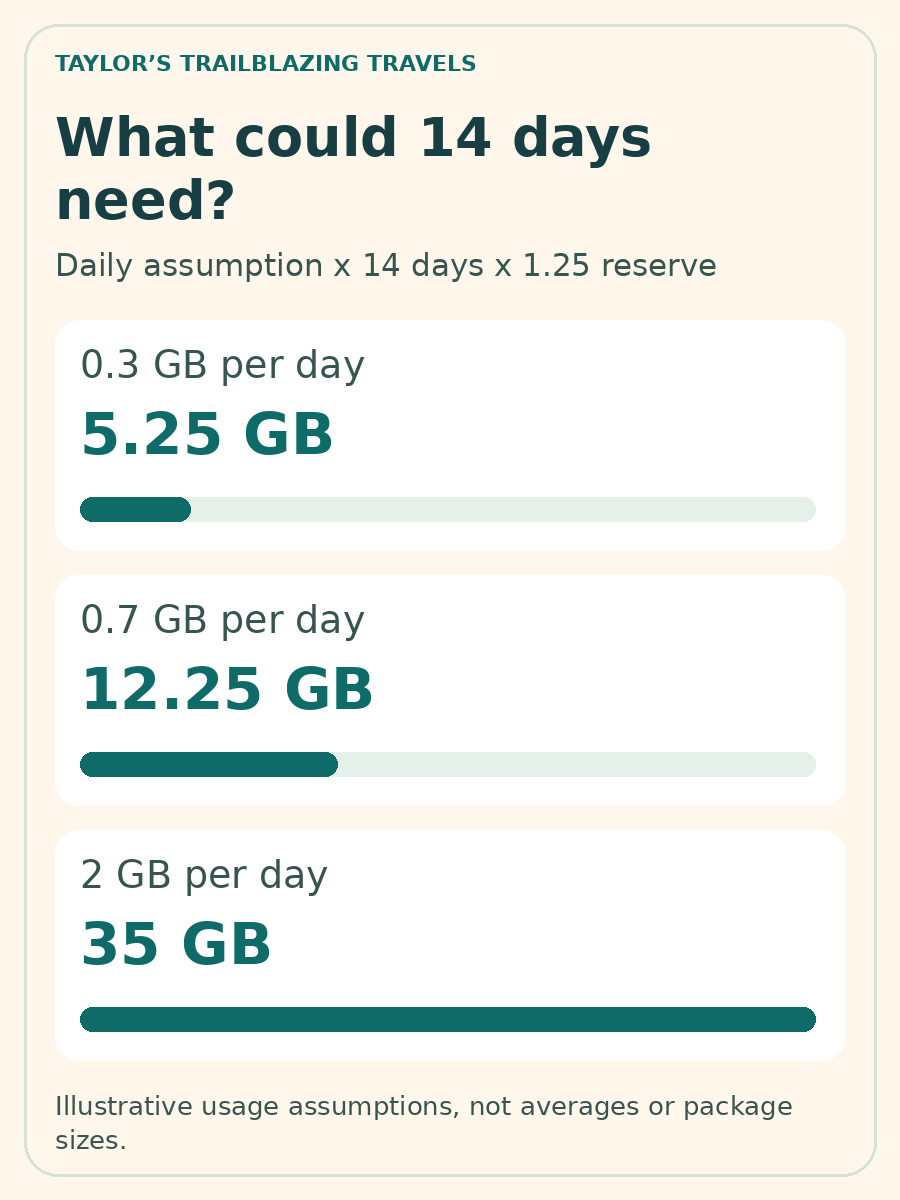
Buy the next suitable available allowance rather than treating a calculated 5.25 GB as a package that must exist. Also check the top-up process: can you buy more data without changing the profile, and will you have a working connection when you need to do it?
Read what unlimited means
Airalo’s published unlimited-data policy allows hotspot use but applies a daily high-speed threshold, after which speed is reduced; package-specific details can differ from the default. Check the exact threshold, reduced speed and reset timing before relying on an unlimited label for laptop work. [8]
Save large map areas, entertainment and installation files over a trusted connection beforehand when that suits your trip. Turn off unwanted automatic photo uploads and app downloads on mobile data. These are controllable choices; trying to predict every megabyte is less useful than preventing an unattended backup from consuming the allowance.
Activation, voice calls and the first hour after landing
Installation and validity are not necessarily the same event. Airalo explains that some packages begin at installation while others begin when they connect to a supported network. Read the purchased package’s policy before installing days or weeks early. [9]
A useful arrival sequence is to activate the intended line, confirm the correct data selection, turn Wi-Fi off briefly and open a simple page. Then test the communication method you need for the next step, such as messaging the accommodation. Do this before leaving a staffed airport area when practical.
Data is not a local phone number
Do not infer voice or SMS service from the fact that maps and messaging apps work. Airalo’s Indonesia page presents data packages; inspect the package details for any voice or number entitlement rather than assuming it exists. Internet messaging and ordinary mobile calls use different service arrangements. [6]
Keep an alternative contact method for a business that expects a conventional telephone call. A companion’s working phone, the accommodation desk or a suitable voice-capable service may solve that need. Do not assume a data-only plan provides the full normal calling functions required in an emergency.
For the convenience of arranging data before arrival, browse Airalo and choose Indonesia. This link opens the general store, not a preselected package. Compare its exact network, validity and features with a local tourist SIM and your home roaming offer before purchase. The recommendation is conditional on device suitability and your route, not a claim that one provider is best everywhere.
Build a backup that does not share the same weakness
Two SIM brands can depend on the same local network. They may therefore fail in the same uncovered location or network outage. Likewise, two phones connected to one portable hotspot still share one connection and one battery.
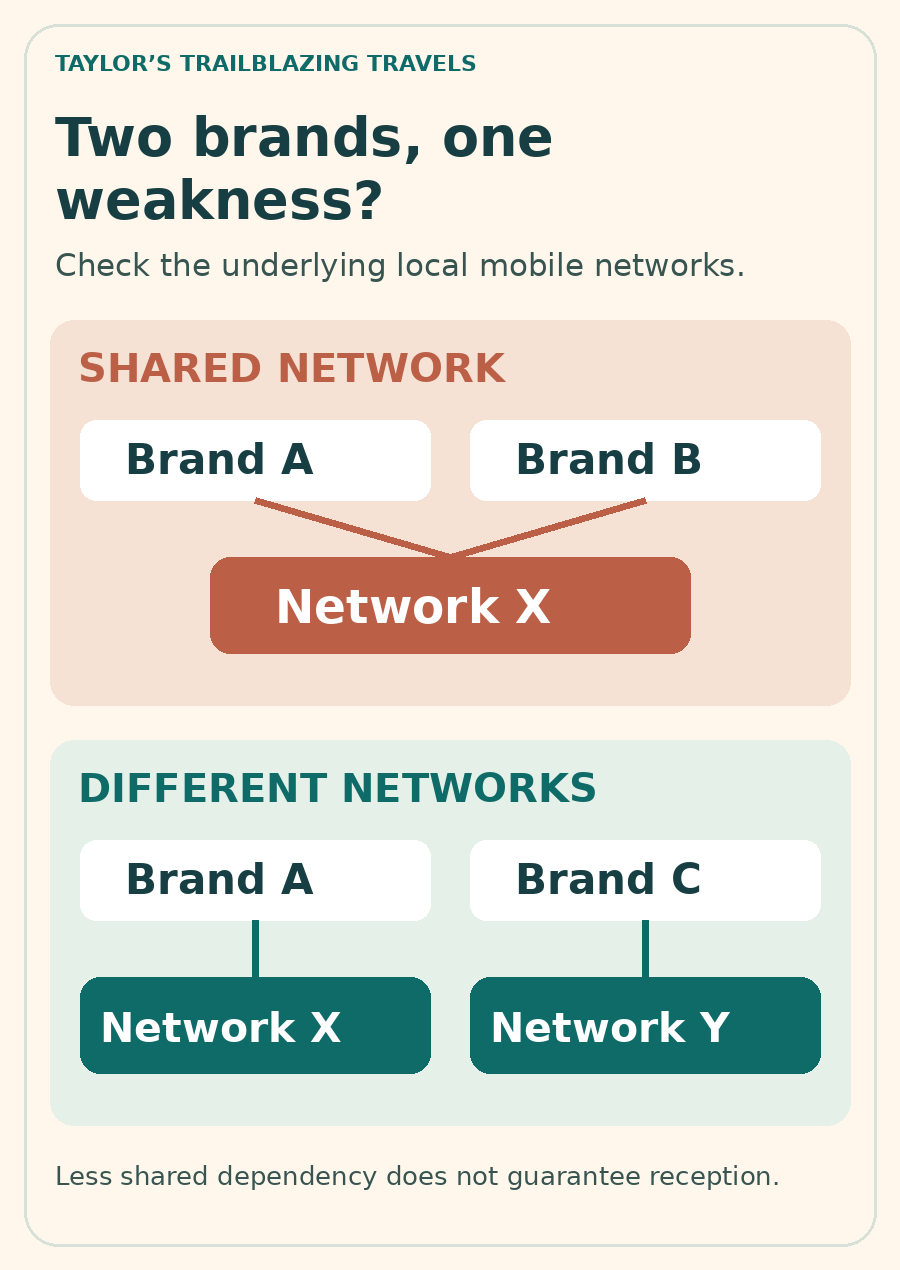
For a couple who genuinely need redundancy, ask whether the two selected services use different local networks in the destination. This can reduce one shared dependency, but it still does not guarantee that either network serves a remote beach or that both survive a wider outage.
| Failure | A useful fallback | What will not solve it |
|---|---|---|
| Mobile allowance exhausted | A valid top-up or another funded line | A second app showing the same exhausted plan. |
| Local network unavailable | A separately supported network or suitable fixed Wi-Fi | Two resellers using only that same network. |
| Phone battery empty | A charged second device or a charging opportunity | More data on the unpowered phone. |
| No networks at the destination | Offline documents and an agreed contact plan | Assuming a larger package improves coverage. |
Store the accommodation address and confirmed pickup instructions offline. Give companions a meeting point and tell a contact when an intentional offline period should end. For an organised remote excursion, ask the operator how it communicates in an emergency; do not present an ordinary consumer eSIM as specialist expedition equipment.
Separate essential access from conveniences. You may tolerate losing social media for an afternoon, but not losing the only copy of a boarding instruction or bank-recovery contact. That distinction should determine the backup you prepare.
Wi-Fi, account access and useful troubleshooting
Use current software and protect important accounts with two-step verification. NCSC recommends this protection for email, banking and other important accounts. Keep recovery methods secure and available without assuming the lost or disconnected phone will always be present. [10]
Confirm the correct Wi-Fi network name with the property rather than selecting a convincing-looking name at random. Avoid installing unexpected profiles or software to obtain a free connection. A VPN does not provide mobile coverage, repair a failed payment or make a fraudulent website legitimate; buying one is not a substitute for checking the service you are using.
If a new plan does not connect, work through a short sequence: confirm the line is enabled, select it for data, check the provider’s roaming and access-point instructions, verify the package is active and restart only as directed. Save screenshots of errors before contacting support. Do not immediately delete the eSIM: replacement or reinstallation rules can differ.
Can I rely on hotel Wi-Fi alone?
Only when your actual arrangements support it. Plan how to contact the hotel from the arrival point, handle a change outside the property and retrieve a booking without Wi-Fi. A low-data connection may be more useful than an expensive plan, but a Wi-Fi-only strategy needs an offline alternative.
Will a new SIM change my existing messaging identity?
Do not change an app’s registered number merely because a new data line is installed. Check the app’s own settings and account-recovery arrangements. The data connection and the identity registered with an app are separate decisions.
Is a regional Asia eSIM automatically better for an Indonesia trip?
Not necessarily. Compare the actual included countries, network access and validity with your route. Regional coverage has value only when the countries and travel dates you need are genuinely included.
The most dependable choice
For a conventional holiday, start with a compatible service that covers your intended bases and a realistic data allowance. For remote stays or essential work, invest more effort in the second connection and offline plan than in chasing the biggest headline allowance. Judge the setup by the jobs it still performs when one part fails.
Sources and editorial approach
This comparison uses published operator, Customs and device guidance. Reception was not field-tested. Data examples are original calculations from stated assumptions; network lists, prices, activation rules and package terms can change.
Independent editorial review: 2 November 2026. Selected official and operator information was rechecked; prices, conditions and links can change, so confirm key details with the provider before travel.
- Apple Support – Using eSIM when travelling internationally
- Apple Support – Mobile-data roaming settings
- Indonesia Customs – IMEI registration FAQ
- Telkomsel – What is Tourist Prepaid Card?
- Telkomsel – Tourist card passport and IMEI eligibility
- Airalo – Indonesia plans and supported networks
- Telkomsel – 5G requirements and coverage
- Airalo – Unlimited data fair-use policy
- Airalo Help – When can I use my eSIM?
- National Cyber Security Centre – Two-step verification
Illustrations in this article were created for Taylor’s Trailblazing Travels. Third-party photographs, where used, are credited beside the image or in the source list.