

Staying Connected in Malaysia: eSIMs, SIM Cards and Rural Coverage
Choose the service behind the SIM, prepare your phone before departure and make a workable plan for places with weak signal.
AI-created editorial illustration of a rainforest setting in Malaysia.
Affiliate disclosure: Taylor’s Trailblazing Travels may earn a commission if you book or buy through links in this guide, at no extra cost to you. Recommendations are selected for their usefulness to the trip.
Staying connected in Malaysia starts with three decisions: whether your phone can use the service, whether the package covers what you need, and whether the underlying network is suitable for your route. A large data allowance does little for a phone that is locked to another provider or a lodge with weak reception.
For a city holiday, a travel eSIM can make arrival easier. For local calls, more data or help at a shop, a Malaysian prepaid plan may be the better fit. Rural journeys need an additional step: check the actual places you are visiting and keep essential information available without a signal.
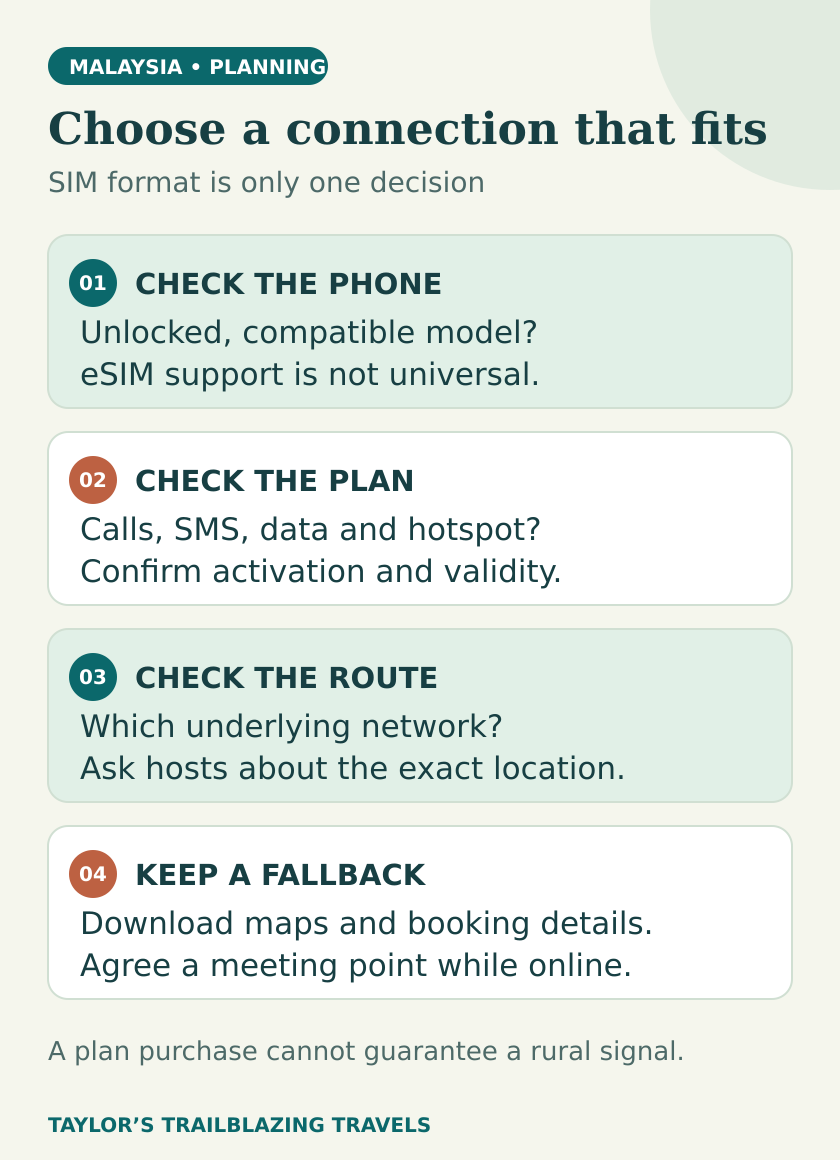
Check compatibility
Confirm eSIM support, regional phone model and network-unlocked status before paying.
Check the service
Data-only, local calls and UK banking texts are different requirements.
Check the route
Look beyond the arrival city to the accommodation, road and boat connections.
Check the clock
Match validity and activation rules to your arrival and departure times.
Choose the service before choosing the SIM format
An eSIM describes how a mobile subscription is installed on your phone. It does not automatically mean a data-only travel service, a Malaysian phone number or better reception. Local operators and international travel providers can both offer eSIMs; the features come from the package. [1]
| Your priority | Option to compare first | Main condition |
|---|---|---|
| Data arranged before arrival | A travel eSIM | Compatible, unlocked phone; correct activation policy and destination coverage |
| A Malaysian number and local calls | A Malaysian prepaid plan | Registration eligibility and the actual call/SMS allowance |
| No SIM changes or new account | Your home provider’s Malaysia roaming package | Check destination inclusion, daily charging and fair-use limits |
| Phone without eSIM support | A physical local SIM or suitable home roaming | Physical SIM slot, unlocked phone and a way to retain necessary home-number access |
| Rural stays or work that cannot wait | A network chosen for the specific location, with a fallback | Ask the host; do not choose by allowance or national marketing claims alone |
A data-only package can support internet messaging and app calls without providing ordinary mobile calls or SMS. Airalo distinguishes these plan types explicitly. [2] If a hotel, driver or booking service needs to call a local number, decide how you will handle that before choosing the cheapest data bundle.
Start by checking your existing contract. A roaming allowance you already pay for may be sufficient for a short visit. Confirm Malaysia is actually included, whether receiving or making calls triggers extra charges, and whether tethering is allowed. Do not assume an allowance covering Europe also covers Malaysia.
Compare a few useful Malaysia options
These are examples of different approaches, not a ranking of every Malaysian operator. The right choice depends on the phone, registration route, local-number requirement and places you will visit. Prices and allowances below were checked on 6 November 2026; confirm the final total and terms before buying.
| Option | What the provider lists | Decision point |
|---|---|---|
| Airalo Malaysia travel eSIM | Data-only packages; Maxis shown as the primary network | Convenient pre-trip purchase; choose allowance and duration, then check the final price and activation policy. [3] |
| Hotlink Travel SIM | RM35 for 15 days, with 100GB fair use, hotspot and domestic calls; this pass is advertised in eSIM form | Useful when you want local service and an allowance covering more than 14 days. Confirm the registration route for a foreign passport. [4] |
| CelcomDigi Tourist SIM | RM35 for 14 days; up to 18Mbps, 200GB fair use and hotspot | A local prepaid option; confirm phone-number, call conditions and the full purchase total. [5] |
| Your home provider | Contract-specific Malaysia roaming | Compare the whole trip cost with buying another plan; daily charges can matter more than the headline allowance. |
Hotlink’s published RM35 tourist price includes the stated non-Malaysian service tax. [12] CelcomDigi’s main product page says its advertised passes include a SIM activation fee; check the exact pack and final amount at purchase. [13] The examples are quoted in MYR rather than converted at an assumed exchange rate.
Airalo’s country page identifies a real Malaysia offering, but a travel eSIM still needs to suit your device and route. You can compare travel eSIMs at Airalo, then select Malaysia and review the package details. This link opens the provider’s store; it is not a promise of a particular package or price.
Do not pay for a huge allowance you will not use while overlooking a short validity period. Equally, the cheapest modest package may be poor value if you need repeated top-ups or local voice calls it does not provide.
Back to top ↑Check your phone before paying
Confirm both compatibility and network lock
Check the exact model and regional variant, not just the phone family. Airalo requires an eSIM-capable device with no carrier restrictions, and provides a device-checking guide. [14] If you are uncertain about Android support, use the manufacturer’s guidance and ask your home network about unlocking.
On an iPhone, the About screen under General shows the carrier or network-provider lock status. Apple’s guidance says an unlocked phone displays “No SIM Restrictions”. [1] Complete any unlocking process while you still have time to resolve it at home.
Plan how both numbers will work
If the phone supports the necessary dual-SIM arrangement, you can use a travel line for data while keeping your home line for calls and texts. Check the home provider’s charges first. A phone capable of storing several eSIMs may still restrict how many lines can be active together; verify the device’s actual capabilities.
If fitting a physical Malaysian SIM means removing your only home SIM, store it safely and decide how you will receive bank verification messages. Set up any permitted banking-app authentication before departure. Changing the data connection does not move SMS sent to your UK number onto a new Malaysian number.
Keep your home number active only under terms you understand. Turning off its data roaming does not automatically make every incoming call, outgoing call or message free.
Buy and register through an authorised channel
For a local tourist SIM, take your original passport. CelcomDigi’s current tourist-plan guidance requires the original valid passport for verification and states that foreign nationals can register a maximum of two accounts under that plan. It directs purchasers to its stores and authorised partners. [5]
Have your accommodation details and any relevant entry documents available in case the provider needs them. Ask the seller to explain the package name, expiry, local number, calling allowance and any renewal conditions before paying. Keep the receipt and the official support details.
At a shop, turn off Wi-Fi briefly and load an ordinary web page to check that mobile data works. If calls or hotspot are part of the reason for choosing the plan, test those functions as well. Do this before leaving the counter, while help is easy to obtain.
Hotlink lists physical Travel SIM sales through selected Maxis Centres, including KLIA terminals and several tourist locations. [4] Its travel eSIM is also advertised, but confirm the current passport-holder signup route; an eSIM badge is not proof that every traveller can complete app registration from abroad.
For an eSIM-only handset, resolve that eligibility question before departure. A physical SIM counter is not a useful fallback if the phone has no physical SIM slot.
Back to top ↑Install deliberately and check the data line
Installation and the start of a package’s validity are not always the same event. Airalo says many plans begin when they first connect to a supported network in the destination, while some begin on installation. Read the individual policy before installing well ahead of a trip. [7]
- Use a reliable internet connection and follow the provider’s instructions for your device and current app version.
- Label the new line clearly, so that you can distinguish it from your home SIM.
- Select the intended travel line for mobile data when it is time to use it.
- Set data roaming for that specific line exactly as the provider instructs. Some travel eSIMs need it enabled.
- Disable automatic mobile-data switching if you want to prevent an unintended fallback to your home line.
- Check the remaining allowance and actual expiry shown by the provider.
Airalo’s installation guidance covers the data-line selection, any required access-point settings and data-switching controls; exact menus vary with device and app version. [15] Do not copy an APN value from someone else’s blog: use the one provided for your package, if one is required at all.
Keep a copy of the purchase details and support instructions accessible offline. If a connection fails, do not delete the eSIM as your first troubleshooting step; establish with the provider whether it can be reinstalled before making a change that may remove it.
Back to top ↑Check rural coverage at the places you will actually use it
A coverage map is a planning aid. Maxis explicitly says its maps are predictive and that actual service can vary with terrain, buildings, equipment and other limitations. [6] CelcomDigi makes similar qualifications and offers a network-status checker for service disruptions. [8]
For a rural or island stay, ask the host a precise question: “Which mobile operator works inside the rooms and at the arrival point?” A useful answer refers to the property, not just the nearest town. If working online matters, ask about the connection used for Wi-Fi and recent upload performance as well as download speed.
| Route setting | What to check | Preparation that helps |
|---|---|---|
| Kuala Lumpur or another city base | Coverage at your accommodation and the package’s normal data/call limits | Test mobile data before relying on it for the first transfer |
| Peninsular road trip or highland stay | The route and overnight stops, not only the starting city | Download maps and keep accommodation directions outside a live messaging thread |
| Sabah or Sarawak rural lodge | The host’s current operator experience and Wi-Fi arrangements | Agree the pickup details and next check-in before leaving the previous connected stop |
| Island, boat or park excursion | How the operator communicates if your mobile has no service | Save meeting points, tickets and return arrangements offline |
| Time-sensitive remote work | Recent property-level connection evidence and an alternative place to work | Avoid scheduling essential calls while in transit or relying on untested accommodation Wi-Fi |
The backup should have a different failure mode. Buying two brands that both use the same underlying mobile network may do little to improve coverage. For example, Airalo currently lists Maxis for its Malaysia offer, so check the actual network before treating another Maxis-based service as independent protection. [3] A second network can add an option; it cannot guarantee a signal.
For genuinely remote excursions, agree communications and missed-contact arrangements with the responsible operator. Keep enough battery power to use the offline material you have saved. A mobile data package is not an emergency-communications plan.

Estimate data with your own habits
Use your phone’s recent mobile-data statistics as a starting point, then adjust for holiday behaviour. A week spent mostly on home Wi-Fi is a poor guide to a trip where you will share photographs and use a hotspot throughout the day.
Planned allowance = assumed daily mobile use × travel days + a chosen reserve.
| Chosen daily budget | Calculation | Result | How to use it |
|---|---|---|---|
| 0.25GB | 0.25 × 14 + 1GB reserve | 4.5GB | Compare a package above this total, with enough validity |
| 0.5GB | 0.5 × 14 + 2GB reserve | 9GB | Check the price of the next suitable allowance and top-up terms |
| 2GB | 2 × 14 + 5GB reserve | 33GB | Compare larger allowances, hotspot rules and speed limits |
Choose the assumptions that resemble your plans, then watch actual usage after the first day. Video quality, automatic photo backups, laptop updates and shared hotspots can change the result substantially. If you want to save data, download entertainment beforehand and review which apps may update or back up over mobile data.
Read what “unlimited” means
A fair-use policy can limit the high-speed portion of an unlimited package. Airalo’s published default policy slows unlimited plans to 1Mbps after more than 3GB in a 24-hour period, unless a different threshold is stated in the package. [11] That is different from an unlimited service at an unchanged speed throughout the day.
Compare the high-speed allowance, any fixed speed cap, hotspot allowance and what happens after a threshold. A large number on the sales page does not answer all four questions.
Back to top ↑Keep banking texts and shared devices in the plan
Your bank still sends messages to the registered number
A data-only eSIM cannot receive ordinary SMS addressed to your home SIM. Airalo explains that another enabled line can handle calls and texts while the travel eSIM provides data; the home provider’s roaming charges still need checking. [9]
Before travelling, confirm how your bank authorises online purchases and account access. Keep an approved alternative method available if it offers one. Never assume that installing a new data plan will solve a blocked bank account or a home SIM that cannot roam.
A hotspot makes one connection serve several people
Airalo permits tethering where the device and network support it; a required APN may need to be entered for hotspot use too. [10] Check the specific plan’s terms and test before making it the family’s only connection.
Sharing is convenient when everyone stays together, but it ties other devices to one phone’s battery, location and allowance. For adults who will split up during the day, separate connections can be more useful than the absolute lowest total SIM cost. Keep children’s or shared-device downloads within the allowance you have chosen.
Back to top ↑Use Wi-Fi sensibly and troubleshoot in order
Ask staff for the correct Wi-Fi network name rather than joining a similarly named hotspot. Keep your phone and apps updated and use the official provider app or website for support. For sensitive tasks on an unfamiliar network, mobile data is a useful alternative; the Northern Ireland Cyber Security Centre recommends avoiding unknown hotspots and considering a reputable VPN when public Wi-Fi is necessary. [16]
A VPN does not create mobile coverage, increase a data allowance or make a fake payment page trustworthy. If you already use one, check how to operate it before travelling. Avoid installing an unfamiliar “free security” app merely because a hotspot page tells you to.
If mobile data stops working
- Check whether the package has expired or its allowance is exhausted.
- Confirm that the intended SIM is enabled and selected for data.
- Check the provider’s instructions for roaming and any required APN.
- Check for a network outage, then try flight mode on, then off or restart the phone.
- If the provider allows manual selection, choose a supported network listed in your package rather than an arbitrary one.
- Contact support through its official channel if the problem continues.
Provider guidance supports checking line status, allowance, device settings and network disruption before making major changes. [8] [15] Keep your original eSIM installed while troubleshooting unless support specifically advises otherwise.
Back to top ↑Match the connection to the whole journey
Count the time from activation to the last journey you need the phone for. A holiday described as two weeks can include an arrival morning and a late departure beyond a package’s exact validity window. Check the displayed expiry time rather than assuming that 14 nights and 14 days are interchangeable.
For a multi-country trip, list each country and date. Hotlink’s Travel SIM advertises data use in Malaysia, Singapore, Thailand and Indonesia, but that does not mean every Malaysia-only eSIM has the same coverage. [4] The Trip Itinerary Planner can help you lay out your stops and nights; check each network package against those dates separately.
- Exact phone checked for compatibility and network lock.
- Registration route and required documents understood.
- Data, voice, SMS and hotspot needs considered separately.
- Coverage checked at overnight stops and rural destinations.
- Home-number authentication and roaming charges understood.
- Tickets, maps, addresses and pickup details saved offline.
- Validity, renewals and support details retained.
Questions travellers ask
Does an eSIM get better reception than a physical SIM?
The format does not determine coverage. The underlying network, package access, phone and location matter. Compare the service and route suitability first; use eSIM or physical SIM according to the device and registration process.
Will a Malaysia eSIM work in Sabah and Sarawak?
Check the package’s stated coverage and supported network, then check the particular accommodation and route. A Malaysia label is not a promise that every island, valley, road or park has mobile service. Ask a rural host about current reception at the property.
Can I use WhatsApp with a data-only eSIM?
Internet-based messaging and app calls can work over the data connection. That is different from receiving normal phone calls or SMS on the eSIM. Check the plan type and keep access to any number needed for account verification. [2]
Should I install the eSIM before I travel?
Often this is convenient on reliable Wi-Fi, but first read the package’s activation policy. Some plans begin their validity on installation, while others start on connection to a supported destination network. [7]
Your next decision
For ordinary sightseeing, choose the simplest package that works with your phone, covers the whole stay and provides the calls you actually need. For rural Malaysia, put the location check ahead of the data allowance. Prepare a home-number plan and offline copies before departure, then test the connection while help is nearby.
Sources and editorial checks
This comparison uses provider product information, device guidance and network-map limitations reviewed on 6 November 2026. The selection framework and data examples are editorial planning tools. No SIM was purchased, speed test performed or rural signal measured for this article; allowances and reception must be checked for your own package and route.
- Apple Support — Using eSIM while travelling internationallyChecked 6 November 2026
- Airalo — Calls and texts with an eSIMChecked 6 November 2026
- Airalo — Malaysia eSIM packagesChecked 6 November 2026
- Hotlink — Travel SIMChecked 6 November 2026
- CelcomDigi Help — Tourist SIM FAQChecked 6 November 2026
- Maxis — Mobile Network MapChecked 6 November 2026
- Airalo — When can I use my eSIM?Checked 6 November 2026
- CelcomDigi — Network Status CheckerChecked 6 November 2026
- Airalo — Receiving SMS and calls with a data-only eSIMChecked 6 November 2026
- Airalo — Tethering and Personal HotspotChecked 6 November 2026
- Airalo — Unlimited Data Plans Fair Use PolicyChecked 6 November 2026
- Maxis — Hotlink’s 2026 Travel SIM optionsChecked 6 November 2026
- CelcomDigi — Tourist SIM product informationChecked 6 November 2026
- Airalo — Device compatibilityChecked 6 November 2026
- Airalo — Installation and connection guidance for iOSChecked 6 November 2026
- Northern Ireland Cyber Security Centre — Secure your devicesChecked 6 November 2026
Illustrations in this article were created for Taylor’s Trailblazing Travels. Third-party photographs, where used, are credited beside the image or in the source list.